
Building and using trees
The Tree tab
Section titled “The Tree tab”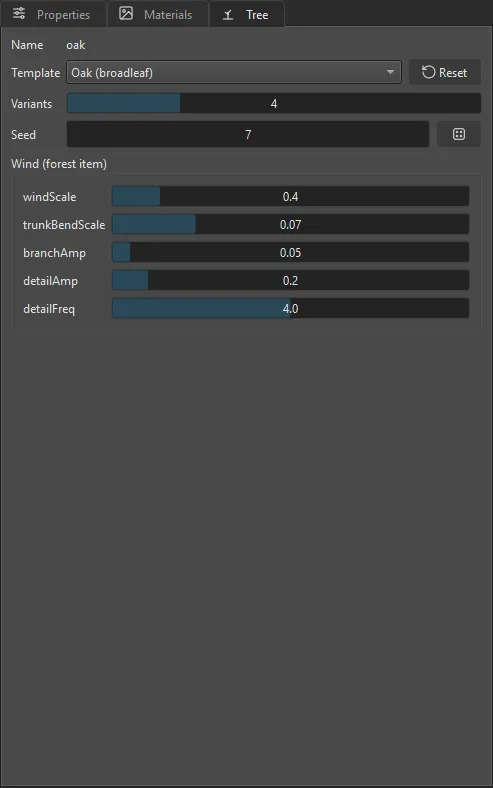
| Setting | |
|---|---|
| Template | The species template the tree started from. Reset replaces the generators, forces and materials with the template’s. |
| Variants | How many forest items Build writes (1-12): <name>_v0, <name>_v1, … Each is the same tree grown with its own seed, so a forest doesn’t repeat one model. |
| Seed | The seed of every variant. The dice button picks a new one. |
| Wind | The forest item’s wind settings, which BeamNG reads with the vertex colours shown in the Wind colours view: windScale (overall response), trunkBendScale (how far the trunk bends), branchAmp (branch sway, by the blue colour), detailAmp and detailFreq (leaf flutter, by the red colour). Defaults come from the template’s species. |
Problems with the generator graph (a missing parent, a type that can’t grow on its parent, no bark slot) are listed at the bottom of the tab.
The Tree generator at the top of the generator list holds the rest of the whole-tree settings:
- Sink: how far the base reaches below the ground, so trees on slopes don’t float.
- Detail Scale %: scales the pixel sizes at which the game switches detail levels.
- Mid Min Radius / Far Min Radius: branches thinner than this lose their skin at middle and far detail.
- Collision: Trunk puts a convex prism (Collision Radius % of the trunk, at most Collision Height tall) around the lower trunk, so vehicles hit the trunk and not the crown. None lets them drive through (bushes).
Build saves the tree and writes its variants into the project’s assets:
assets/shapes/terrano_trees/<name>/<name>_v<i>.dae: three detail levels, a billboard (bb_autobillboard25, which the game draws far away) and the collision mesh.main.materials.jsonbeside them, with materials namedtrn_<name>_<id>_<slot>. The id keeps two projects’ trees apart in BeamNG’s global material namespace.- forest items
<name>_v0… (with the wind settings) inassets/forest/managedItemData.json.
The status line says whether the tree is built or has unbuilt changes, and closing the editor or switching trees asks before throwing changes away. Rebuilding keeps the names, so Foliage nodes and exported levels pick up the new models on the next export.
Use in Foliage
Section titled “Use in Foliage”Use in Foliage lists the project’s Foliage nodes and their tiers (Canopy, Small Trees, Shrubs, Rocks, Clutter). Add to Item Types appends the tree’s name to that tier, replace Item Types makes it the only type. You can also type the name into Item Types, Boulder Types or Types by Material yourself.
A tree’s name stands for all its variants, so my_beech in Item Types scatters my_beech_v0 to
my_beech_v3. The trees appear in the Real preview and in the Asset Browser like stock forest items.
Export
Section titled “Export”Both exports take the trees along. Create BeamNG Level and
Export into an existing level copy the project’s built models, materials and
imported textures into the level, and add the forest items to its managedItemData.json. Textures from the
game’s common content are referenced, not copied; textures from another level or a mod are listed as a
dependency.